Bài viết này Hocban.vn chia sẻ đến bạn cách thêm hiệu ứng đèn led cho website WordPress. Hiệu ứng này không dùng plugin, chỉ là code thuần HTML CSS được đóng gói và ráp vào function của WordPress. Cách lắp đèn như này cũng rất đơn giản, ai cũng có thể làm được ^^
Đây là một trong các nội dung thuộc chuỗi các chia sẻ về Trang trí website dịp Giáng Sinh của Hocban.vn | Nếu bạn thích trang trí website mùa Noel cho đẹp và sinh động thì cứ theo dõi bài viết đó là được. Các bài viết tách riêng về code tương tự như này mình đều để link trong bài viết đó.
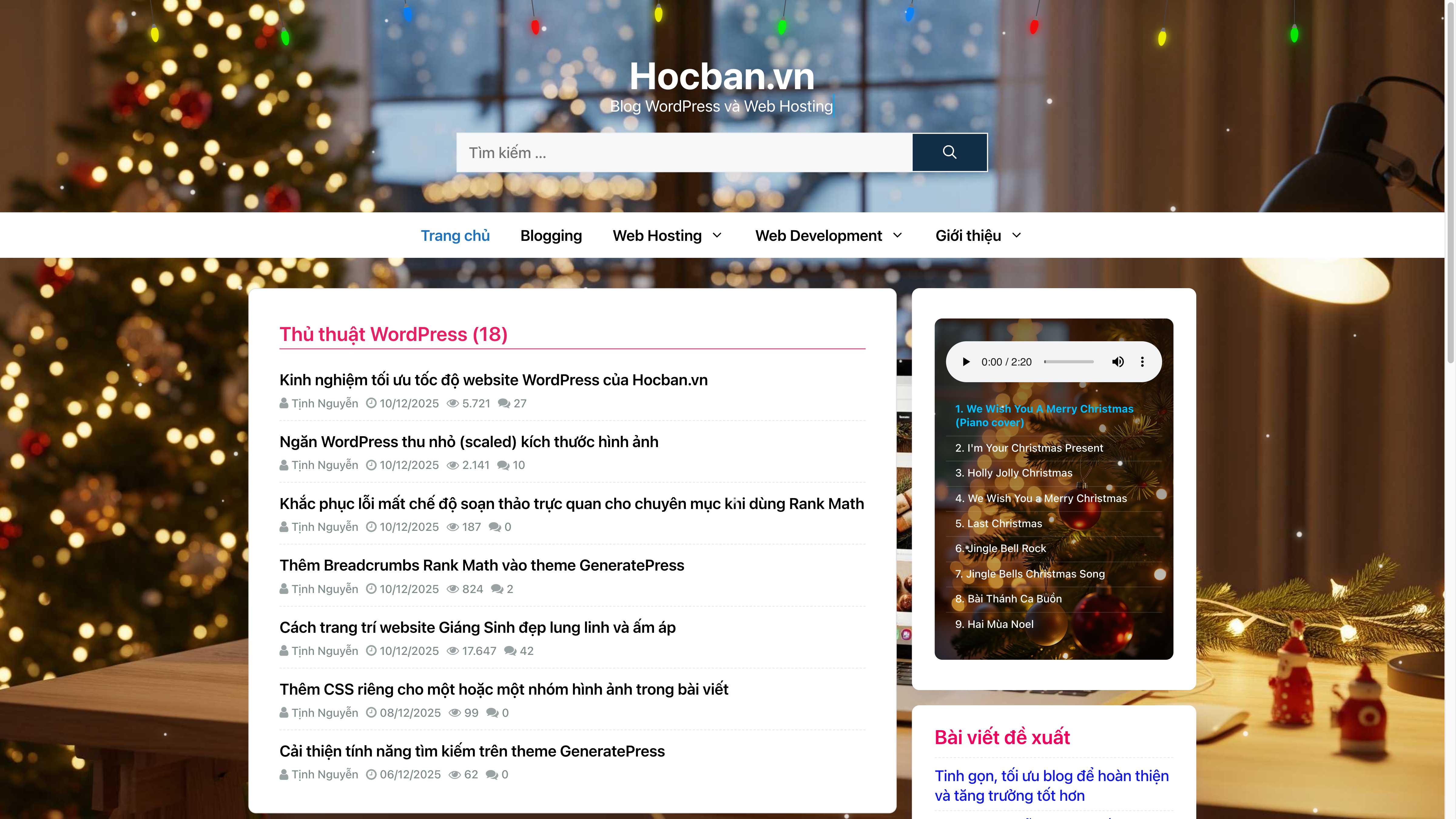
Nói thêm về hiệu ứng: Mình tinh chỉnh khá kỳ công từ khâu làm một chiếc bóng led sao cho giống thật rồi đến sau cùng là một dãy led sinh động với hiệu ứng đung đưa, đổi màu và nhấp nháy như ảnh trên.
Trước mắt mình có một phiên bản code như dưới đây, mùa Noel năm sau mình sẽ làm thêm phiên bản dây led có thêm quà và các món đồ trang trí khác trên đó để sinh động hơn, năm nay tạm đơn giản vậy thôi, cũng rất đẹp rồi. Bạn chỉ cần copy và dán đoạn code đó vào phía dưới cùng trong file Functions.php của theme/ child theme đang dùng. Khi nào không cần nữa thì vào xoá đoạn code đó đi là xong.
//ĐÈN LED GIÁNG SINH
function hocban_led_strip_css() {
$hocban_led_css = <<<CSS
<style>
.inside-header.grid-container { min-height: 250px; }
.led-strip-wrapper { display: none; }
@media (min-width: 768px) {
.led-strip-wrapper { display: block; width: 100%; margin-top: -10px; padding-top: 5px; position: absolute; top: 0; left: 0; height: 50px; z-index: 9999; }
body { background-color: #0a192f; margin: 0; padding: 0; overflow-x: hidden; }
@keyframes swing { 0%, 100% { transform: rotate(-12deg); } 50% { transform: rotate(12deg); } }
@keyframes color-shift { 0%, 24% { background-color: #FF0000; color: #FF0000; } 25%, 49% { background-color: #FFFF00; color: #FFFF00; } 50%, 74% { background-color: #00FF00; color: #00FF00; } 75%, 100% { background-color: #007FFF; color: #007FFF; } }
.led-strip-container { display: flex; width: 80%; margin: 0 auto; justify-content: space-between; align-items: flex-start; box-sizing: border-box; }
.finished-bulb { position: relative; width: 15px; height: 35px; margin: 0; top: 2px; transform-origin: top center; animation: swing 1s cubic-bezier(0.42, 0, 0.58, 1) infinite alternate; }
.finished-bulb .bulb-body { animation: color-shift 4s linear infinite; width: 10px; height: 20px; position: absolute; top: 29px; left: 50%; opacity: 0.9; border-radius: 50% / 60% 60% 40% 40%; transform: translateX(-50%) rotate(180deg) skewY(-5deg); box-shadow: 0 0 10px currentColor, 0 0 50px currentColor, 0 0 100px currentColor, 0 0 160px rgba(255, 255, 255, 0.2), 0 0 200px currentColor; z-index: 9; }
.finished-bulb:nth-child(1) .bulb-body { animation-delay: 0s; } .finished-bulb:nth-child(2) .bulb-body { animation-delay: -1s; } .finished-bulb:nth-child(3) .bulb-body { animation-delay: -2s; } .finished-bulb:nth-child(4) .bulb-body { animation-delay: -3s; } .finished-bulb:nth-child(5) .bulb-body { animation-delay: -0.5s; } .finished-bulb:nth-child(6) .bulb-body { animation-delay: -1.5s; } .finished-bulb:nth-child(7) .bulb-body { animation-delay: -2.5s; } .finished-bulb:nth-child(8) .bulb-body { animation-delay: -3.5s; } .finished-bulb:nth-child(9) .bulb-body { animation-delay: -0.25s; } .finished-bulb:nth-child(10) .bulb-body { animation-delay: -1.25s; }
.finished-bulb:nth-child(2) { animation-delay: 0.1s; } .finished-bulb:nth-child(3) { animation-delay: 0.2s; } .finished-bulb:nth-child(4) { animation-delay: 0.3s; } .finished-bulb:nth-child(5) { animation-delay: 0.4s; } .finished-bulb:nth-child(6) { animation-delay: 0.5s; } .finished-bulb:nth-child(7) { animation-delay: 0.6s; } .finished-bulb:nth-child(8) { animation-delay: 0.7s; } .finished-bulb:nth-child(9) { animation-delay: 0.8s; } .finished-bulb:nth-child(10) { animation-delay: 0.9s; }
.finished-bulb::before { content: ""; position: absolute; top: 0px; left: 50%; transform: translateX(-50%); width: 1px; height: 25px; background-color: #444; z-index: 12; }
.finished-bulb .bulb-base { width: 8px; height: 5px; background-color: #777; position: absolute; top: 25px; left: 50%; transform: translateX(-50%); z-index: 15; clip-path: polygon(35% 0%, 70% 0%, 95% 100%, 5% 100%); border: 0.5px solid #888; }
.finished-bulb:nth-child(odd)::before { height: 8px; } .finished-bulb:nth-child(odd) .bulb-base { top: 8px; } .finished-bulb:nth-child(odd) .bulb-body { top: 12px; }
.finished-bulb:nth-child(1)::before, .finished-bulb:nth-child(10)::before { height: 35px; } .finished-bulb:nth-child(1) .bulb-base, .finished-bulb:nth-child(10) .bulb-base { top: 35px; } .finished-bulb:nth-child(1) .bulb-body, .finished-bulb:nth-child(10) .bulb-body { top: 39px; }
.finished-bulb:nth-child(2)::before, .finished-bulb:nth-child(9)::before { height: 40px; } .finished-bulb:nth-child(2) .bulb-base, .finished-bulb:nth-child(9) .bulb-base { top: 40px; } .finished-bulb:nth-child(2) .bulb-body, .finished-bulb:nth-child(9) .bulb-body { top: 44px; }
.finished-bulb:nth-child(1) { height: 45px; } .finished-bulb:nth-child(10) { height: 45px; } .finished-bulb:nth-child(2) { height: 50px; } .finished-bulb:nth-child(9) { height: 50px; }
}
@media (min-width: 1024px) { .inside-header.grid-container { margin-top: 30px; } }
</style>
CSS;
echo $hocban_led_css;
}
function hocban_led_strip_html() {
$hocban_bulb_html = '';
for ($i = 0; $i < 10; $i++) {
$hocban_bulb_html .= '<div class="finished-bulb"><div class="bulb-base"></div><div class="bulb-body"></div></div>';
}
$hocban_led_html = '<div class="led-strip-wrapper"><div class="led-strip-container">' . $hocban_bulb_html . '</div></div>';
echo $hocban_led_html;
}
add_action( 'wp_head', 'hocban_led_strip_css' );
add_action( 'wp_footer', 'hocban_led_strip_html' );
Mặc dù nói đây là code dành cho website dùng WordPress, tuy nhiên bản chất nó cũng chỉ là HTML CSS. Ae coder nếu dùng nền tảng khác cũng có thể chuyển đổi sang để tận dụng, không cần phải thiết kế lại từ đầu. Làm cái này tốn thời gian lắm đó ^^
