Bài viết này mình lưu lại, cũng như chia sẻ đến bạn về GeneratePress Homepage Widget mà Hocban.vn đang sử dụng. Đây là một bộ code tạo nên bản sắc riêng của mình về xu hướng giao diện trang chủ từ 2021 đến giờ (giai đoạn đã bỏ thumbnail). Sản phẩm là gì thì bạn xem hình minh hoạ bên dưới là sẽ hiểu ^^
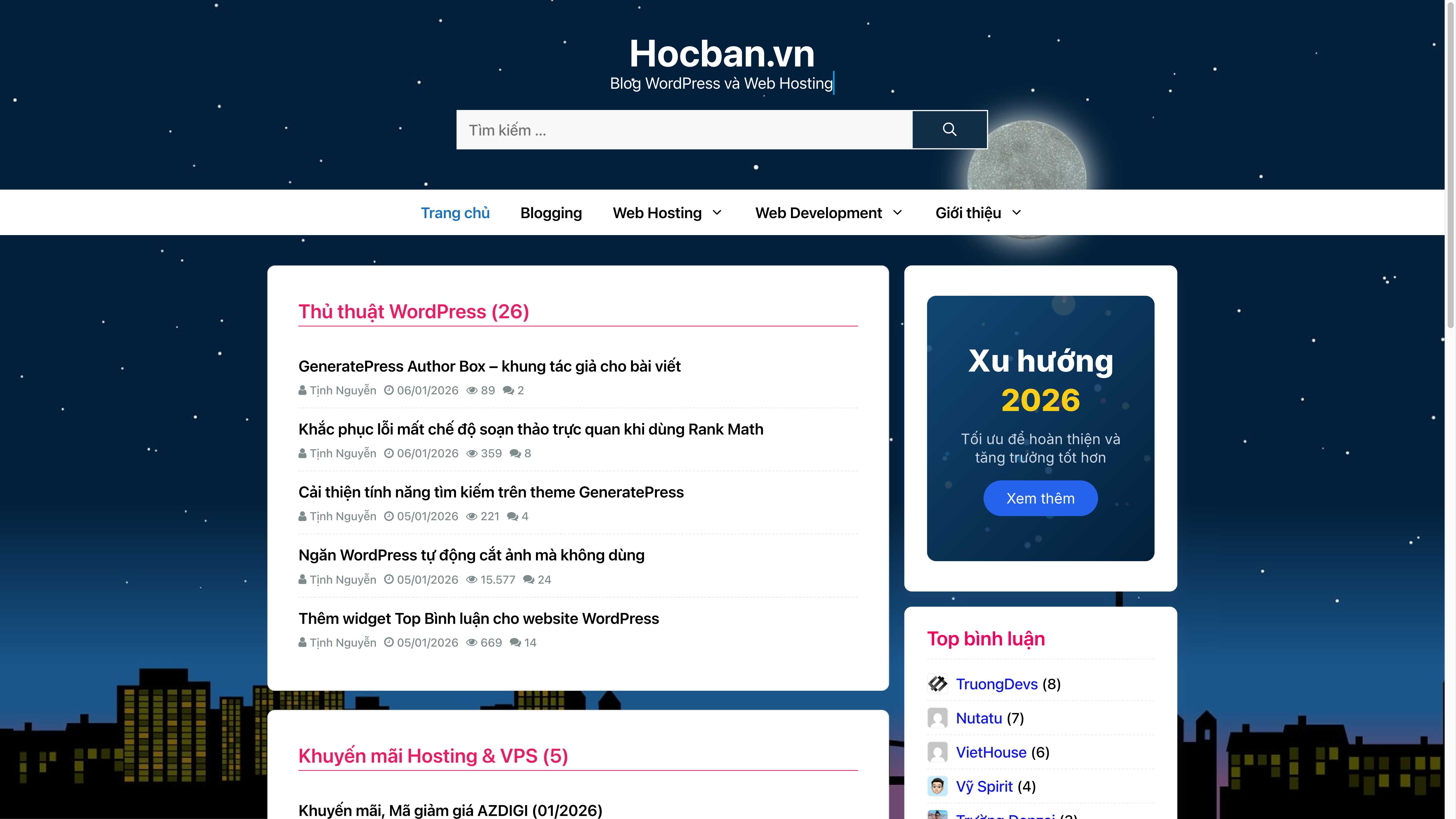
Để thực hiện thì chúng ta cần trải qua 4 bước, trong đó bước đầu tiên là tạo phải tạo child theme GeneratePress rồi mới tiến hành nè (dùng plugin cho khoẻ, bạn tham khảo plugin WP Child Theme Generator). Trong child theme mặc định sẽ có 2 file style.css và functions.php >> bạn vào host tạo thêm 1 file nữa tên là homepage.php sau đó mở file ra >> copy code bên dưới dán vào và lưu lại.
<?php
/**
* Template Name: Trang chủ với Widget
*/
get_header(); ?>
<div id="primary" <?php generate_do_element_classes( 'content' ); ?>>
<main id="main" <?php generate_do_element_classes( 'main' ); ?>>
<?php
$hocban_h1 = get_bloginfo('name');
$hocban_desc = get_bloginfo('description');
if (!empty($hocban_desc)) { $hocban_h1 .= ' - ' . $hocban_desc; }
echo '<h1 class="screen-reader-text">' . esc_html($hocban_h1) . '</h1>';
do_action('generate_before_main_content');
?>
<div class="homepage-widgets-wrapper">
<?php
if (is_active_sidebar('homepage-widgets')) {
dynamic_sidebar('homepage-widgets');
} else {
?>
<div class="homepage-no-widgets">
<div style="max-width: 600px; margin: 60px auto; text-align: center; padding: 40px; background: #f9f9f9; border: 2px dashed #ddd; border-radius: 8px;">
<h2 style="color: #333; margin-bottom: 15px;">Trang chủ chưa có nội dung</h2>
<p style="color: #666;">Vào <strong>Giao diện → Widgets</strong> để thêm widget</p>
</div>
</div>
<?php
}
?>
</div>
<?php do_action('generate_after_main_content'); ?>
</main>
</div>
<?php
do_action('generate_after_primary_content_area');
generate_construct_sidebars();
get_footer();
Tiếp đến là chèn code bên dưới vào cuối file functions.php của child theme và lưu lại >> hoàn tất thêm tính năng tạo homepage widget cho theme GeneratePress.
// Homepage Widget GeneratePress
function hocban_register_homepage_widget_area(): void {
register_sidebar([
'name' => 'Widget Homepage',
'id' => 'homepage-widgets',
'description' => 'Kéo thả widget vào đây để hiển thị trên trang chủ',
'before_widget' => '<div class="homepage-category-widget">',
'after_widget' => '</div>',
'before_title' => '<h2 class="widget-title-homepage">',
'after_title' => '</h2>',
]);
}
add_action('widgets_init', 'hocban_register_homepage_widget_area');
if (!function_exists('getPostViewsCount')) {
function getPostViewsCount(int $postID): int {
return absint(get_post_meta($postID, 'post_views_count', true));
}
}
class Homepage_Category_Posts_Widget extends WP_Widget {
public function __construct() {
parent::__construct(
'homepage_category_posts',
'📄 GP Category Posts',
['description' => 'Phân loại và sắp xếp bài viết theo chuyên mục', 'customize_selective_refresh' => true]
);
}
public function form($instance): void {
$instance = wp_parse_args((array) $instance, ['title' => '', 'category' => '', 'number' => 5, 'orderby' => 'modified', 'show_count' => true, 'show_author' => true, 'show_date' => true, 'show_views' => true, 'show_comments' => true]);
?>
<p><label>Tiêu đề:</label><input class="widefat" name="<?php echo $this->get_field_name('title'); ?>" type="text" value="<?php echo esc_attr($instance['title']); ?>"></p>
<p><label>Chuyên mục:</label>
<select class="widefat" name="<?php echo $this->get_field_name('category'); ?>">
<option value="">-- Chọn chuyên mục --</option>
<?php
$categories = get_categories(['hide_empty' => false]);
foreach ($categories as $cat) { printf('<option value="%d" %s>%s</option>', $cat->term_id, selected($instance['category'], $cat->term_id, false), esc_html($cat->name)); }
?>
</select></p>
<p><label>Số bài hiển thị:</label><input class="widefat" name="<?php echo $this->get_field_name('number'); ?>" type="number" value="<?php echo absint($instance['number']); ?>"></p>
<p><label>Sắp xếp theo:</label>
<select class="widefat" name="<?php echo $this->get_field_name('orderby'); ?>">
<option value="date" <?php selected($instance['orderby'], 'date'); ?>>Ngày đăng</option>
<option value="modified" <?php selected($instance['orderby'], 'modified'); ?>>Ngày cập nhật</option>
<option value="rand" <?php selected($instance['orderby'], 'rand'); ?>>Ngẫu nhiên</option>
<option value="comment_count" <?php selected($instance['orderby'], 'comment_count'); ?>>Bình luận nhiều nhất</option>
</select></p>
<p><strong>Hiển thị:</strong></p>
<?php
$opts = ['show_count' => 'Hiện tổng số bài', 'show_author' => 'Hiện tác giả', 'show_date' => 'Hiện ngày tháng', 'show_views' => 'Hiện lượt xem', 'show_comments' => 'Hiện bình luận'];
foreach ($opts as $key => $label) : ?>
<p><input type="checkbox" id="<?php echo $this->get_field_id($key); ?>" name="<?php echo $this->get_field_name($key); ?>" <?php checked($instance[$key], true); ?>> <label for="<?php echo $this->get_field_id($key); ?>"><?php echo $label; ?></label></p>
<?php endforeach;
}
public function update($new_instance, $old_instance): array {
$instance = [];
$instance['title'] = sanitize_text_field($new_instance['title'] ?? '');
$instance['category'] = absint($new_instance['category'] ?? 0);
$instance['number'] = max(1, absint($new_instance['number'] ?? 5));
$instance['orderby'] = sanitize_key($new_instance['orderby'] ?? 'modified');
foreach (['show_count', 'show_author', 'show_date', 'show_views', 'show_comments'] as $key) { $instance[$key] = !empty($new_instance[$key]); }
return $instance;
}
public function widget($args, $instance): void {
$category_id = absint($instance['category'] ?? 0);
if (!$category_id) return;
$category = get_category($category_id);
if (!$category) return;
$q = new WP_Query(['cat' => $category_id, 'posts_per_page' => absint($instance['number'] ?? 5), 'post_status' => 'publish', 'ignore_sticky_posts' => true, 'orderby' => sanitize_key($instance['orderby'] ?? 'modified'), 'order' => 'DESC', 'no_found_rows' => false]);
$total_posts = $q->found_posts;
if (!$q->have_posts()) { wp_reset_postdata(); return; }
echo $args['before_widget'];
$title_text = !empty($instance['title']) ? $instance['title'] : $category->name;
if (!empty($instance['show_count'])) $title_text .= " ({$total_posts})";
echo $args['before_title'] . '<a href="' . esc_url(get_category_link($category_id)) . '">' . esc_html($title_text) . '</a>' . $args['after_title'];
?>
<ul class="homepage-posts-list">
<?php while ($q->have_posts()): $q->the_post(); $pid = get_the_ID(); ?>
<li class="homepage-post-item">
<h3 class="post-item-title"><a href="<?php the_permalink(); ?>"><?php the_title(); ?></a></h3>
<div class="post-item-meta">
<?php if (!empty($instance['show_author'])): ?><span><i class="fa fa-user"></i> <?php the_author(); ?></span><?php endif; ?>
<?php if (!empty($instance['show_date'])): ?><span><i class="fa fa-clock-o"></i> <?php echo get_the_modified_date('d/m/Y'); ?></span><?php endif; ?>
<?php if (!empty($instance['show_views'])): ?><span><i class="fa fa-eye"></i> <?php echo number_format(getPostViewsCount($pid), 0, ',', '.'); ?></span><?php endif; ?>
<?php if (!empty($instance['show_comments'])): ?><span><i class="fa fa-comments"></i> <?php echo get_comments_number($pid); ?></span><?php endif; ?>
</div>
</li>
<?php endwhile; ?>
</ul>
<?php
echo $args['after_widget'];
wp_reset_postdata();
}
}
add_action('widgets_init', function() { register_widget('Homepage_Category_Posts_Widget'); });
add_action('wp_head', function() {
if ( ! ( is_front_page() || is_home() ) || ! is_active_sidebar( 'homepage-widgets' ) ) return;
?>
<style>
.homepage-category-widget { background: #fff; border: 1px solid #e0e0e0; border-radius: 10px; padding: 20px; margin-bottom: 25px; box-shadow: 0 1px 3px rgba(0,0,0,0.05); }
@media (min-width: 600px) { .homepage-category-widget { padding: 40px; } }
.widget-title-homepage { font-weight: 600; margin: 0 0 10px 0; padding-bottom: 2px; border-bottom: 1px solid #e91e63; color: #2c3e50; line-height: 1.3; font-size: 28px; }
.widget-title-homepage a { color: #e91e63; font-size: 26px; text-decoration: none; transition: color 0.2s ease; }
.widget-title-homepage a:hover { color: #FF9800; }
.homepage-posts-list { list-style: none; margin: 0; padding: 0; }
.homepage-post-item { padding: 12px 0; border-bottom: 1px dashed #e8e8e8; }
.homepage-post-item:last-child { border-bottom: none; }
.post-item-title { font-size: 17px; font-weight: 600; margin: 0 0 5px 0; line-height: 1.5; }
.post-item-title a { color: black; font-size: 120%; text-decoration: none; }
.post-item-title a:hover { color: #ff9800; }
.post-item-meta { display: flex; flex-wrap: wrap; gap: 10px; font-size: 75%; color: #7f8c8d; }
.post-item-meta span { display: inline-flex; align-items: center; gap: 4px; }
@media (max-width: 768px) {
.homepage-category-widget { border: 0; border-radius: 0px; padding: 40px 20px; box-shadow: none; }
.widget-title-homepage { font-size: 20px; margin-bottom: 10px; }
.widget-title-homepage a { font-size: 130%; }
}
</style>
<?php
});
// Homepage Widget GeneratePress
Bây giờ bạn tạo mới một trang, tại mục thuộc tính trang bạn đặt mẫu trang là Trang chủ với widget >> Tiêu đề của trang chủ thì đặt như bình thường, nội dung thì viết sơ bộ kiểu giới thiệu ngắn về website, blog của bạn, bao gồm những chủ đề gì chẳn hạn. Thêm mô tả cho SEO như Rank Math, Yoast SEO,…. >> Đặt ảnh đại diện trang >> lưu trang lại.
Tiếp theo, mở trang chủ ra (bắt buộc phải đang ở trang chủ) >> tuỳ chỉnh giao diện >> đặt trang chủ là trang đã tạo, nếu trang hiển thị thumbnail thì tắt ảnh thumbnail đi >> mở mục Widget (tiện ích) sẽ thấy lúc này bạn đã có Widget Hompage >> nhấp vào và thêm widget như thường. Bạn tìm và thêm widget GP Category Posts >> tuỳ chỉnh theo ý muốn: chọn chuyên mục, thông tin meta bài viết cần hiển thị, sắp xếp theo trình tự nào,…. Tương tự như vậy, bạn muốn thêm mấy widget thì thêm.
