Bài viết này chia sẻ đến ae đoạn code để thêm hiệu ứng pháo hoa cho cho website WordPress. Ưu điểm của code này là nó thuần HTML & CSS, không có JavaScript nên rất nhẹ, đẹp và cũng đủ xài. Ae nào có nhu cầu thêm hiệu ứng để trang trí Tết cho web, blog thì tham khảo thử nhé !
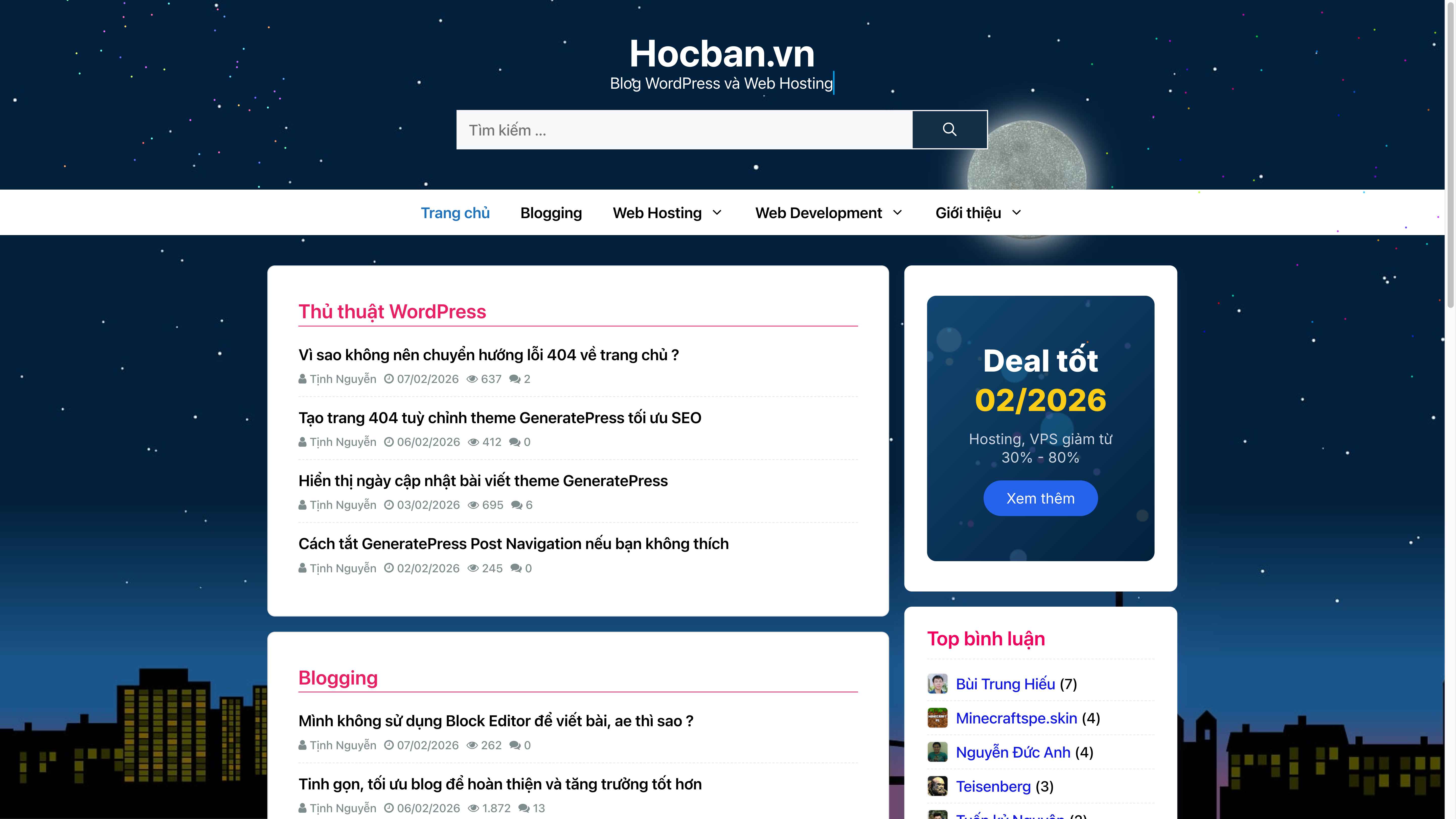
Để chèn vào website WordPress thì ae copy đoạn code bên dưới >> chèn vào phía dưới cùng trong file functions.php của theme/ child theme đang dùng là được. Mà khỏi cần child theme luôn, dán thẳng vào cuối file functions.php của theme chính, xài hết mấy ngày Tết thì xoá ^^
//Hiệu ứng pháo hoa siêu nhẹ chỉ với HTML & CSS
add_action('wp_footer', 'hocban_fireworks_css_effect', 100);
function hocban_fireworks_css_effect() : void {
?>
<div class="pyro-container" aria-hidden="true"><div class="pyro left"></div><div class="pyro right"></div></div>
<style>
:root{--f-shadow:-120px -218.6px blue, 248px -16.6px #00ff84, 190px 16.3px #002bff, -113px -308.6px #ff009d, -109px -287.6px #ffb300, -50px -313.6px #ff006e, 226px -31.6px #ff4000, 180px -351.6px #ff00d0, -12px -338.6px #00f6ff, 220px -388.6px #99ff00, -69px -27.6px #ff0400, -111px -339.6px #6200ff, 155px -237.6px #00ddff, -152px -380.6px #00ffd0, -50px -37.6px #00ffdd, -95px -175.6px #a6ff00, -88px 10.3px #0d00ff, 112px -309.6px #005eff, 69px -415.6px #ff00a6, 168px -100.6px #ff004c, -244px 24.3px #ff6600, 97px -325.6px #ff0066, -211px -182.6px #00ffa2, 236px -126.6px #b700ff, 140px -196.6px #9000ff, 125px -175.6px #00bbff, 118px -381.6px #ff002f, 144px -111.6px #ffae00, 36px -78.6px #f600ff, -63px -196.6px #c800ff, -218px -227.6px #d4ff00, -134px -377.6px #ea00ff, -36px -412.6px #ff00d4, 209px -106.6px #00fff2, 91px -278.6px #000dff, -22px -191.6px #9dff00, 139px -392.6px #a6ff00, 56px -2.6px #0099ff, -156px -276.6px #ea00ff, -163px -233.6px #00fffb, -238px -346.6px #00ff73, 62px -363.6px #0088ff, 244px -170.6px #0062ff, 224px -142.6px #b300ff, 141px -208.6px #9000ff, 211px -285.6px #ff6600, 181px -128.6px #1e00ff, 90px -123.6px #c800ff, 189px 70.3px #00ffc8, -18px -383.6px #00ff33, 100px -6.6px #ff008c;--f-white:0 0 white,0 0 white,0 0 white,0 0 white,0 0 white,0 0 white,0 0 white,0 0 white,0 0 white,0 0 white,0 0 white,0 0 white,0 0 white,0 0 white,0 0 white,0 0 white,0 0 white,0 0 white,0 0 white,0 0 white,0 0 white,0 0 white,0 0 white,0 0 white,0 0 white,0 0 white,0 0 white,0 0 white,0 0 white,0 0 white,0 0 white,0 0 white,0 0 white,0 0 white,0 0 white,0 0 white,0 0 white,0 0 white,0 0 white,0 0 white,0 0 white,0 0 white,0 0 white,0 0 white,0 0 white,0 0 white,0 0 white,0 0 white,0 0 white,0 0 white,0 0 white;}
.pyro-container{position:fixed;inset:0;width:100%;height:100%;pointer-events:none;z-index:999999;overflow:hidden;}
.pyro{position:absolute;width:2.5px;height:2.5px;border-radius:50%;will-change:transform,opacity;}
.pyro.left{left:12%;animation:hbB 1.2s ease-out infinite,hbG 1.2s ease-in infinite,hbML 10s steps(1) infinite;}
.pyro.right{right:12%;animation:hbB 1.2s ease-out infinite,hbG 1.2s ease-in infinite,hbMR 10s steps(1) infinite;animation-delay:0.6s;}
@keyframes hbB{0%{box-shadow:var(--f-white);}100%{box-shadow:var(--f-shadow);}}
@keyframes hbG{0%{transform:translate3d(0,0,0);opacity:1;}85%{opacity:1;}100%{transform:translate3d(0,180px,0);opacity:0;}}
@keyframes hbML{0%{margin-top:15vh;}33%{margin-top:35vh;}66%{margin-top:20vh;}}
@keyframes hbMR{0%{margin-top:25vh;}33%{margin-top:10vh;}66%{margin-top:40vh;}}
@media(max-width:1023px){.pyro-container{display:none;}}
</style>
<?php
}
//Hiệu ứng pháo hoa siêu nhẹ chỉ với HTML & CSS
Năm nay mình chưa có ý tưởng gì trang trí Tết cho nó có không khí hết ae ạ. Loay hoay nghĩ ra cái vụ bắn pháo hoa này, thấy cũng nhẹ và không làm ảnh hưởng đến tông màu của Hocban hiện tại. Ae có đang lắp hiệu ứng pháo hoa không ? Có code nào hiển thị đẹp mà nhẹ, xin nhờ ae để lại link demo bên dưới bình luận, cảm ơn ae !
